

Case Study: Pinnacle Treatment Centers
Improving data visibility and efficiency
In order to operate most efficiently, healthcare organizations with multiple locations need consistent, clean data and the ability to implement changes simultaneously across many centers. Pinnacle Treatment Centers, an addiction treatment provider with more than 135 locations in nine states, needed some way to better manage its 100+ separate databases. Reimagined Consulting worked with Pinnacle to create a global administration tool that provided oversight and management of all the company’s separate databases. Now, the Pinnacle team can implement and oversee changes in a fraction of the time it used to take, creating a better experience for staff and ultimately a better patient care experience..
Opportunity
Seeking efficiency, consistency, and ease in managing multiple databases
Pinnacle began in Pennsylvania with four outpatient facilities dedicated to treating alcohol and substance use disorders. From these modest beginnings, it went on to acquire over 135 locations in nine different states, and is now one of the nation’s leading providers of addiction treatment.
Early on, to manage operations the IT team created database templates for each state. Each time a Pinnacle location opened, it was assigned a new database.
With the expansion of the organization, however, managing all of these databases became downright cumbersome. Basic operational tasks like creating case note templates, making changes to forms, adding assessments, creating signature blocks, and granting security privileges become extremely burdensome when the changes need to be made individually in more than 100 databases.
“When anyone requested a change, we’d always ask, ‘How big of a deal is this?’” said Rob Pleiman, senior director of systems at Pinnacle. “Is it worth the hours it will take to swap this form for an additional textbox or to fix a typo?”
What’s more, the more a task is repeated, the better chance that error creeps in. With over 100 databases that had to be individually updated, data consistency became a problem as well. When Pinnacle switched billing systems, it had to add categories for each patient billing scenario, which meant that a single payer might be listed up to 10 different ways in the system. Additionally, different databases might use different naming conventions, which meant confusion and wasted time for staff who used the system.
Pleiman said, “I kept saying, ‘We need a tool where we can have everything, live, in one place that would allow us to make global changes. Wouldn’t that be a dream?”
Solution
A global administrative tool for efficient management and oversight
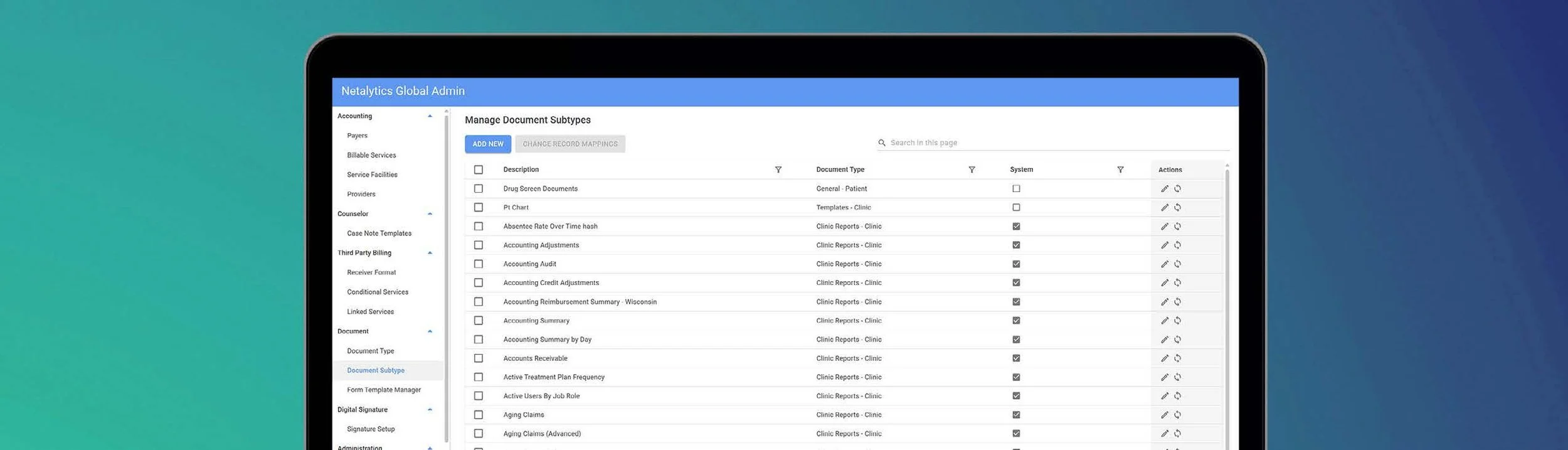
When Reimagined created a global administrative tool for Pinnacle to gain control of its unwieldy database system, it was a dream come true.
“For an organization like ours that is so data driven, clean data is essential. And we just did not have that with 103 separate and disconnected databases,” Pleiman said. “Now, even though we have 103 databases, this tool has essentially made it so we have one database, a master database that has everything in it and where we can choose what goes into each database. So it really gives us a global view we never had before.”
Having a master tool to control its many separate databases means that operations that used to take multiple days to complete now can be done in a fraction of the time.
Results
Cleaner data, updated systems, and happier staff
Pinnacle has already seen a cascade of positive changes from implementing the global administrative tool. Having global oversight has created cleaner data, which in turn provides more consistency and cuts down on human error. Technical staff no longer have to put off changing things that would have previously been too time consuming to undertake; this means that systems are more up to date and staff can work more efficiently, focusing their attention on patient care rather than wrestling with system configuration.
Using the global administrative tool created by Reimagined, Pinnacle can now much more easily:
Create or change new case note templates and add them to databases.
Update and create forms and add them to relevant databases.
Set up signatures for all different objects within the EMR database.
Add assessments across all databases.
Grant security and access privileges.